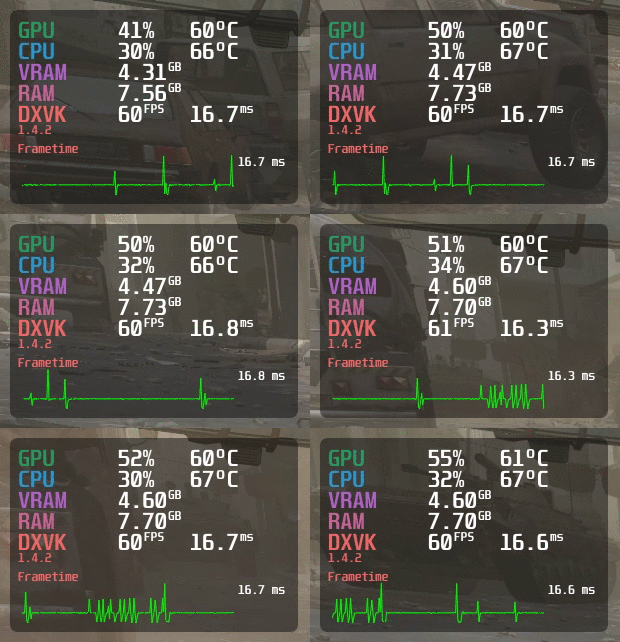
A reproducible Steam Deck testing workflow that separates live MangoHud readings from measured averages, percentiles and preserved benchmark evidence.
Published September 3, 2026Updated September 3, 2026
Category
Performance
Difficulty
Intermediate
Reading time
10 min
Published
September 3, 2026
HandheldAtlas guide
Complete walkthrough
Introduction
A performance overlay is useful evidence, but it is not automatically a benchmark. A screenshot showing 40 FPS proves that the game reached 40 FPS at that instant. It does not prove the average frame rate, the stability of a whole test route, the 1% low, battery life or how the same preset behaves after the device warms up.
MangoHud can display frame rate, frame time, hardware load, temperatures, power information and other Linux gaming metrics. It can also log performance data. This guide turns those capabilities into a repeatable Steam Deck workflow without converting one favorable moment into a claimed result.
1. Record the test environment first
Before launching the game, write down every variable another tester would need to reproduce the result:
Steam Deck model: LCD or OLED
SteamOS channel and version
Proton version or native Linux build
game version when an update may affect performance
resolution and refresh rate
frame-rate cap
TDP or power limit
GPU clock limit, if manually set
complete graphics and upscaling settings
VRAM allocation only when it was explicitly changed and verified
date of the test
LCD and OLED Decks do not have identical displays or batteries, so never merge their battery-life or display-specific results. If a field was not recorded, leave it blank.
2. Understand the Steam Deck and Gamescope path
MangoHud's official desktop launch option is:
mangohud %command%
Steam Deck Game Mode runs games through Gamescope. MangoHud's own documentation says that ordinary MangoHud is not supported with Gamescope and that the mangoapp integration is required for that path. Do not assume that a desktop Linux launch option is a universal Steam Deck Game Mode setup recipe.
The built-in Steam Deck performance overlay is sufficient for checking live FPS, frame time, temperatures and power behavior while choosing a test scene. For a published benchmark, preserve a recorded log or other durable evidence in addition to the live overlay whenever the supported setup allows it.
This guide focuses on testing methodology rather than modifying the read-only SteamOS system. Avoid unsupported system-level changes merely to obtain a prettier overlay.
3. Choose one repeatable workload
Use the game's built-in benchmark when it accurately represents play. Otherwise define a route that another person can repeat:
exact save file or chapter
start and end points
camera direction
movement path
weather and time of day when relevant
combat state, NPC density or vehicle speed
fixed test duration
A demanding but repeatable scene is more useful than an unusually light area selected to produce a flattering number. Do not combine results from different scenes into one preset.
4. Warm up the device and control conditions
Connect or disconnect external power consistently. Use the same fan profile, ambient conditions and battery-charge range for comparable runs. Close downloads and background tasks that may introduce unrelated spikes.
Run the scene once without recording. This warm-up pass gives shaders, asset caches and the cooling system time to settle. If the first measured pass is still materially different from later passes, document that behavior instead of discarding it silently.
Thermal throttling, battery limits and background activity can all change the result. The overlay can help diagnose them, but the final evidence should state which conditions were controlled.
5. Configure only the metrics you need
MangoHud can display FPS, frame time, frame-time graphs, resolution, refresh rate, CPU and GPU load, temperatures, power, memory use, battery status and estimated battery time. A readable evidence overlay should normally include:
FPS and frame time
frame-time graph
resolution and refresh rate
CPU and GPU utilization
CPU and GPU temperatures
power or battery discharge rate when available
device battery state for battery testing
More data is not always better. An overcrowded overlay can hide the test scene and make labels unreadable. Save the complete configuration with the evidence so the displayed values are not ambiguous.
6. Record multiple measured runs
Use one fixed duration for every pass. Three measured runs are a practical minimum for a community preset; more runs are preferable when the workload is variable.
Keep every valid run. Do not publish only the fastest result. If one pass contains an interruption, crash, loading screen or unrelated background event, explain why it was excluded and preserve the remaining raw data.
Average FPS should come from the recorded interval, not from a number observed on screen. The same rule applies to low-percentile metrics and frame-time statistics.
7. Label MangoHud percentiles exactly
MangoHud exposes configurable benchmark percentiles. Its example configuration lists a default benchmark_percentiles value of:
97,AVG,1,0.1
These labels must be preserved exactly as produced by the tool or explained by the reporting method. Do not rename a percentile, average or integration method to “1% low” unless the calculation genuinely matches that label.
This matters because tools can use different definitions for low-performance metrics. Two numbers that both sound like a 1% low may not be directly comparable. When the exact calculation is unavailable, publish the average and raw evidence and leave the low field blank.
8. Preserve an evidence package
A credible Steam Deck preset should include:
one screenshot showing the final in-game settings
one overlay capture from the named test scene
raw log files for every measured pass when available
the exact MangoHud configuration
test duration and number of passes
a written description of the route or built-in benchmark
the recorded environment from step 1
a last-verified date
Store evidence at a durable URL. A preset becomes unverifiable when its screenshots or logs disappear, even if the written settings remain.
A short gameplay video can add context and reveal traversal stutter, but it is not mandatory when the test scene, settings, raw logs and captures already make the result reproducible. Video without recorded metrics is not a substitute for benchmark data.
9. Treat battery testing as a separate measurement
Battery life should not be estimated from TDP alone. Total system draw includes the display, memory, storage, wireless hardware, speakers, fan and other components.
For a battery claim, record the Deck model, brightness, refresh rate, volume, wireless state, battery-charge interval and total elapsed time. A live battery-time estimate may help during the test, but it is not the same as a completed discharge measurement.
If the source provides only FPS evidence, leave battery life blank.
10. Review the result before publishing
Ask five questions:
Can another Steam Deck owner reproduce the same scene?
Are LCD and OLED results kept separate?
Are all performance metrics tied to a measured interval?
Are percentile labels technically accurate?
Will the evidence links still make sense after the game or SteamOS updates?
If the answer to any question is no, publish the result as a limited baseline or draft rather than presenting it as a complete modern benchmark.
Publication checklist
Exact Deck model recorded
SteamOS and Proton versions recorded when relevant
Resolution, refresh rate, cap and TDP recorded
Complete game settings preserved
Repeatable scene and fixed duration documented
Warm-up pass completed
At least three measured passes retained
Average FPS calculated from the recorded interval
Low metrics labelled exactly or left blank
Overlay screenshot not misrepresented as an average
Raw evidence stored at a durable URL
Last-verified date included
Official sources
MangoHud repository and documentation: https://github.com/flightlessmango/MangoHud
MangoHud example configuration: https://github.com/flightlessmango/MangoHud/blob/master/data/MangoHud.conf
Official overlay example: https://github.com/flightlessmango/MangoHud/blob/master/assets/overlay_example.gif
Final note
The most trustworthy preset is not necessarily the one with the highest FPS. It is the one that clearly states what was tested, preserves the original evidence and refuses to invent the fields that were never measured.