Enable and test Windows hibernation, assign it to the handheld power button, and understand when it is safer than sleep without assuming every game will resume perfectly.
Published September 7, 2026Updated September 7, 2026
Category
Setup
Difficulty
Beginner
Reading time
7 min
Published
September 7, 2026
HandheldAtlas guide
Complete walkthrough
Introduction
A handheld should be able to pause quickly without losing a large part of its battery inside a bag. Windows offers two different tools for that job: sleep and hibernation.
Sleep resumes faster but keeps the system in a powered state. Hibernation writes the current Windows session to the system drive and powers the machine down to almost the same consumption as a full shutdown. Resume takes longer, but hibernation is usually the more predictable choice when a Windows handheld will be unused for hours.
It is not a universal game suspend feature. Save the game first whenever possible, and expect online sessions, anti-cheat services, launchers, audio devices or controllers to require reconnection after resume.
Check what the handheld supports
Open Windows Terminal or Command Prompt and run:
powercfg /a
Microsoft documents /a as the command that reports the sleep states available on the current system. Read the output instead of assuming that every handheld exposes the same modes.
Look for Hibernate among the available states. The report may also explain why it is unavailable, for example because hibernation is disabled or the system is using a reduced hibernation file that supports Fast Startup only.
Do not copy a registry edit from another PC. Device firmware, Windows configuration and manufacturer utilities can change the available states.
Enable hibernation
If Hibernate is disabled, open Terminal or Command Prompt as administrator and run:
powercfg /hibernate on
Microsoft's documentation uses this command to enable the hibernation feature and create the required hiberfil.sys system file.
Run powercfg /a again. If Hibernate is now available, continue to the power-button setup.
If Windows reports that a reduced hibernation file is preventing standard hibernation, an administrator can request a full file:
powercfg /h /type full
A full hibernation file supports standard hibernation, hybrid sleep and Fast Startup. Microsoft notes that changing to a full file is not recommended on systems with less than 32 GB of storage.
The file consumes system-drive space because Windows must preserve the session stored in memory. Microsoft describes the default full hibernation file as approximately 40 percent of physical memory, although the actual configuration can vary. Check free space before enabling it on a nearly full SSD.
Add Hibernate to the power menu
On many Windows 11 systems:
1Open Control Panel.
2Select System and Security.
3Open Power Options.
4Select Choose what the power buttons do.
5Select Change settings that are currently unavailable.
6Enable Hibernate under Shutdown settings.
7Save the changes.
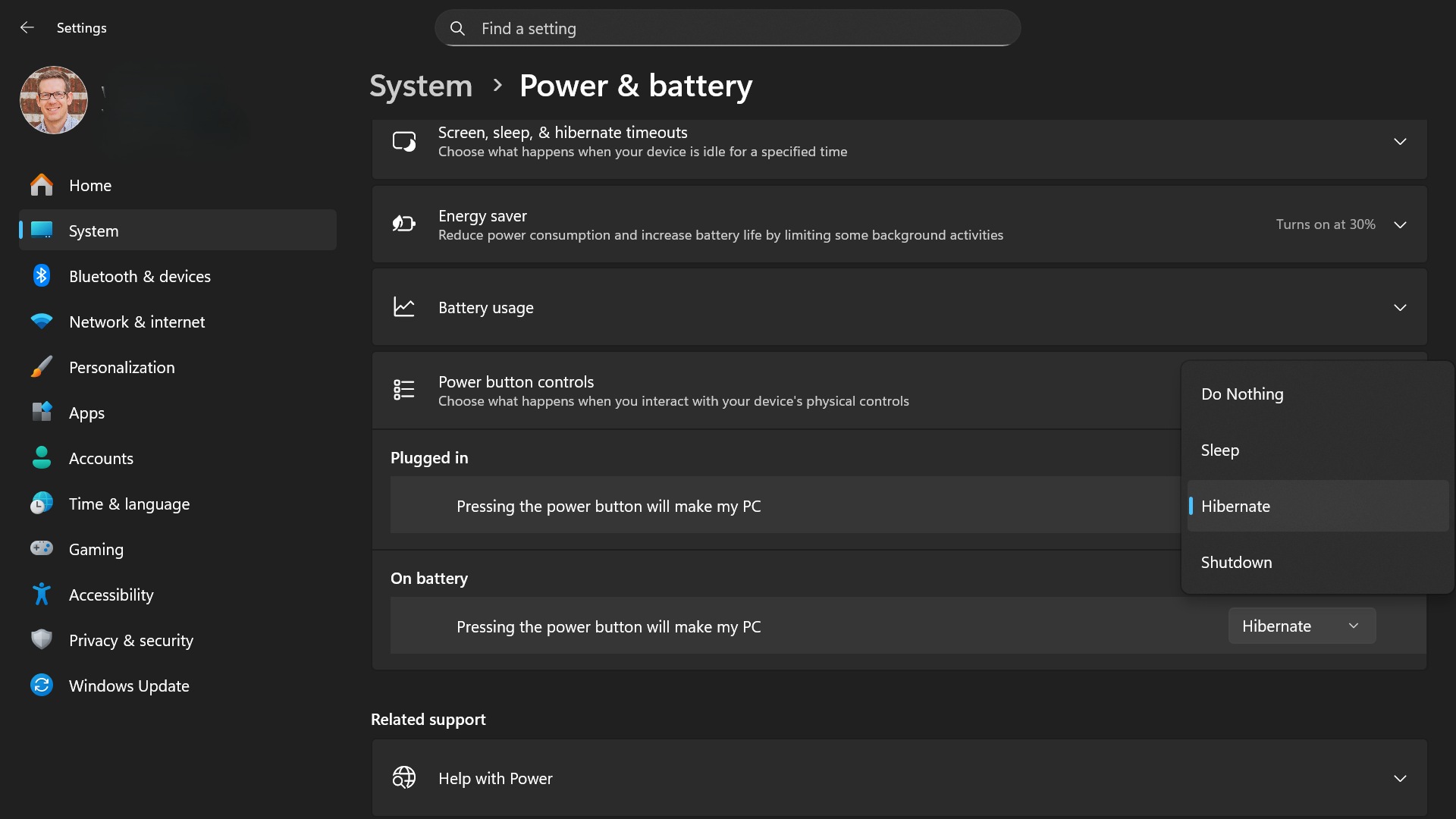
The exact interface can vary with the Windows build and manufacturer. Recent Windows 11 versions may also expose power-button controls under Settings > System > Power & battery.
If the checkbox is missing, return to powercfg /a. A missing or unsupported power state cannot be fixed merely by adding a menu shortcut.
Assign Hibernate to the handheld power button
A physical power button is more useful than navigating the Start menu every time.
Open the available Windows power-button settings and choose Hibernate for Pressing the power button. Configure the On battery and Plugged in entries separately when Windows exposes both.
Test the mapping while no game or unsaved document is open:
1Press the power button once.
2Wait until the screen, fans and status lights settle.
3Leave the device disconnected for several minutes.
4Press the power button again.
5Sign in and confirm that Windows restored the session.
Do not hold the power button. A long press can force the system off and discard the current session rather than hibernate it.
ROG Ally and ROG Xbox Ally controls
ASUS documents a direct Windows 11 route on current ROG Ally devices: open Windows Settings, go to System > Power & battery, and change “Pressing the power button will make my PC” to Hibernate.
ROG Ally models also expose two Eco Assist features in Armoury Crate SE under Settings > Performance > Operating Mode:
Modern Standby Assistant can move the device from sleep to hibernation after a period of time.
Extreme Standby Mode reduces activity while the system remains in the lighter sleep state.
Those options do not turn sleep and hibernation into the same mode. Record which features are enabled when diagnosing battery drain or inconsistent resume behavior.
Other Windows handhelds
Lenovo Legion Go, MSI Claw, AYANEO and other Windows handhelds may expose different menus or manufacturer utilities. Start with powercfg /a, then use the device maker's current support documentation for power-button and standby controls.
Do not assume an ASUS Armoury Crate setting exists on another brand. Likewise, do not force unsupported sleep states through registry changes or unofficial scripts simply to reproduce another device's configuration.
Sleep versus Hibernate
Use sleep when:
you expect to resume after a short break;
the handheld remains on a desk with adequate ventilation;
fast resume matters more than eliminating standby drain;
the game and peripherals have already resumed reliably on that device.
Use hibernation when:
the device will be unused for several hours;
it will travel in a bag or case;
standby drain has been inconsistent;
you want the session preserved without keeping memory powered.
Use a full shutdown when:
Windows, BIOS, firmware or graphics drivers were updated;
a game or driver behaves incorrectly after resume;
the handheld is being stored for a longer period;
you need a clean software state.
Hibernate preserves the Windows session, while a restart tears it down and starts again. It is therefore not a substitute for restarting after updates or troubleshooting a broken driver state.
Game-resume limitations
Before hibernating during a game:
create a manual save when supported;
avoid hibernating during a save, shader compilation or update;
expect multiplayer and cloud-streaming sessions to disconnect;
close overlays or launchers that are already malfunctioning;
resume once at home before trusting the same game during travel.
After resume, check:
controller input;
audio output;
Wi-Fi connection;
frame cap and refresh rate;
manufacturer performance mode;
external display or dock state.
A restored desktop does not prove that the game engine, anti-cheat service and every driver resumed correctly. If a title crashes, loses audio or shows unstable frametimes, restart the game and record that limitation instead of calling the suspend test successful.
Diagnose unexpected battery drain
When the handheld loses more charge than expected during sleep, confirm which state it actually entered.
Useful Microsoft commands include:
powercfg /lastwake
This reports information about the event that most recently woke the system.
powercfg /sleepstudy
On systems that support Modern Standby, this generates a report about recent standby sessions and activity.
powercfg /systemsleepdiagnostics
This creates a diagnostic report covering recent system sleep transitions.
These reports diagnose behavior; they do not repair a driver or prove a universal battery-drain rate. Remove personal file paths, device names or account information before sharing a report publicly.
Disabling hibernation
To disable hibernation, run an administrator terminal and enter:
powercfg /hibernate off
This removes support for standard hibernation and deletes the hibernation file. Microsoft warns that disabling it also prevents hybrid sleep from working and can create data-loss risk if power fails while hybrid sleep was expected to protect the session.
Disable it only when you understand the effect on Hibernate, hybrid sleep and Fast Startup. Reclaiming SSD space is not automatically worth losing a reliable low-power suspend option on a handheld.
Publication checklist
Exact handheld and Windows build recorded
powercfg /a output checked
Hibernate confirmed as available
Full hibernation file enabled only when required
Free system-drive space checked
Power-button action configured for battery and AC use
Desktop hibernate and resume tested first
Game save created before a suspend test
Controller, audio, network and performance mode checked after resume
Online-session disconnects reported
Sleep and hibernation results kept separate
No battery-drain percentage claimed without a timed measurement
Official sources
Microsoft Learn: System power states
https://learn.microsoft.com/en-us/windows/win32/power/system-power-states
Microsoft Learn: Powercfg command-line options
https://learn.microsoft.com/en-us/windows-hardware/design/device-experiences/powercfg-command-line-options
Microsoft Support: Disable and re-enable hibernation
https://learn.microsoft.com/en-us/troubleshoot/windows-client/setup-upgrade-and-drivers/disable-and-re-enable-hibernation
ASUS ROG Support: Shut down, Sleep and Hibernate
https://rog.asus.com/support/faq/1044624/
ASUS ROG: Extend the battery life of a ROG Ally or ROG Xbox Ally
https://rog.asus.com/us/articles/guides/how-to-extend-the-battery-life-of-your-rog-ally/
Final note
Hibernation is the low-power option, not a magic console-style pause button. Confirm support with powercfg /a, enable it through documented Windows controls, test each game and peripheral after resume, and keep a normal save as the real safety net.